### Introduction
The purpose of this write up is to demonstrate how invaluable a tool like Autopsy can be when conducting digital forensics. In order to showcase it, I will be utilising a disk image that comes as part of a lab which can be found [here](https://cfreds.nist.gov/all/NIST/HackingCase). If you want to follow along, feel free to also grab yourself a copy of [Autopsy](https://www.autopsy.com/download/). I’ll be working on Windows but there is an option for Linux.
The lab that we’ll be looking at today is called ‘The Hacking Case’ and is one of many labs available in this [archive](https://cfreds.nist.gov/). Download the ‘Dell Latitude CPi E01’ file.
> [!info] CTF Description
> On 09/20/04, a Dell CPi notebook computer, serial `#VLQLW`, was found abandoned along with a wireless PCMCIA card and an external homemade 802.11b antennae. It is suspected that this computer was used for hacking purposes, although cannot be tied to a hacking suspect, Greg Schardt. Schardt also goes by the online nickname of “Mr. Evil” and some of his associates have said that he would park his vehicle within range of Wireless Access Points (like Starbucks and other T-Mobile Hotspots) where he would then intercept internet traffic, attempting to get credit card numbers, usernames & passwords.
>
> Find any hacking software, evidence of their use, and any data that might have been generated. Attempt to tie the computer to the suspect, Greg Schardt.
### What is Autopsy?
As part of [The Sleuth Kit®](https://www.sleuthkit.org/sleuthkit/index.php) , Autopsy is a graphical tool used by many digital forensics professionals to examine computers. If you’re interested in learning more about the brilliant minds behind such a tool, check out their [About](https://www.sleuthkit.org/about.php) page.
> [!tip]
sleuth \SLOOTH\ verb. 1 : **to act as a detective** _: search for information. 2 : to search for and discover._
Now, of course, there are many tools similar to Autopsy that I undoubtedly will be showcasing here in the future. These alternatives include, but are not limited to, FTK Imager, X-Ways, Volatility, and Magnet AXIOM.
Without further ado, grab your pipe and don your magnifying glass — let the investigation begin!
### Getting Started
To kick things off, let’s import our victim data. Thanks to Autopsy, this step is made ridiculously trivial; just follow the boxes and provide the information that Autopsy needs to generate our new case. As a best practice, avoid using your daily driver to store case files and victim data — use a separate or external drive. If this isn’t feasible, create a new folder on your main drive and add it to an exclusion list to prevent Windows Defender interrupting our session with constant alerts.
💡 To add an exclusion: Windows Security > Virus & Threat Protection Settings > Add or Remove Exclusions
The final stage of the import can take a bit of time–around 15–20 minutes– as the built-in modules need to do their magic. Once it has finished analysing, we’re good to go.
### Analysis
1. **What is the image hash? Does the acquisition and verification hash match?**
We can find this information using the Metadata which also tells us that the operating system is Windows XP which answers question two.

**3. When was the install date?**
Access ‘vol2’ to show the file system.
`Windows > System32 > Config > Software Hive > Microsoft > WindowsNT > CurrentVersion`

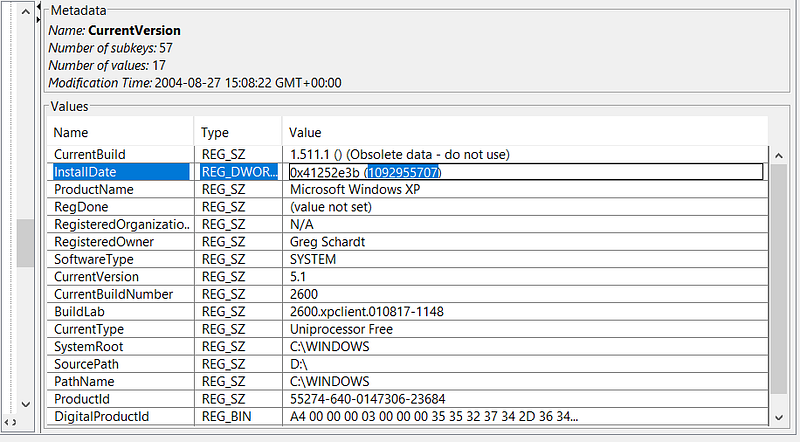
At first glance, this date seems a bit peculiar–it’s stored in [Unix Timestamp](https://en.wikipedia.org/wiki/Unix_time) format, which is essentially the count of seconds elapsed since January 1st, 1970 in Coordinated Univeral Time (UTC). The exact time can vary based on the timezone chosen during the import stage. Passing this into an online calculator gives us ‘Thursday, 19 August 2004 22:48:27_’_ in GMT. But which timezone? Let’s check the System Hive.
`Windows > System32 > Config > System Hive > ControlSet001 > Control > TimeZoneInformation`
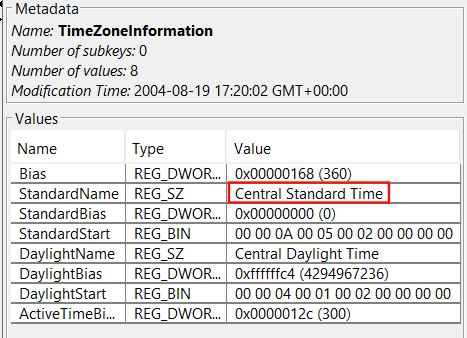
**4. What are the time zone settings?**
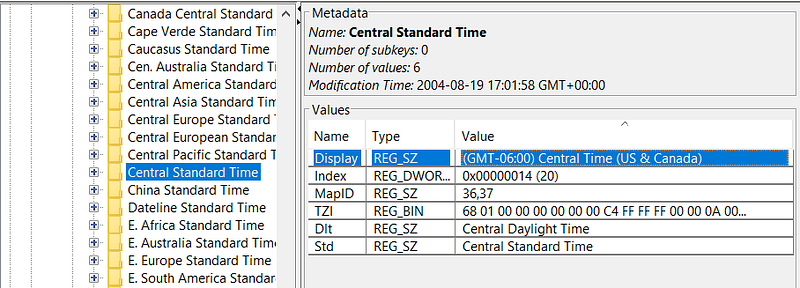
Bingo, GMT -6. This translates to a local time of 4:48:27.
**5. Who is the registered owner?**
You may start to see a pattern emerging: the registry hives are proving to be our most valuable assets in retrieving a majority of the information.
`Windows > System32 > Config > Software Hive > Microsoft > Windows NT > CurrentVersion > RegisteredOwner
`
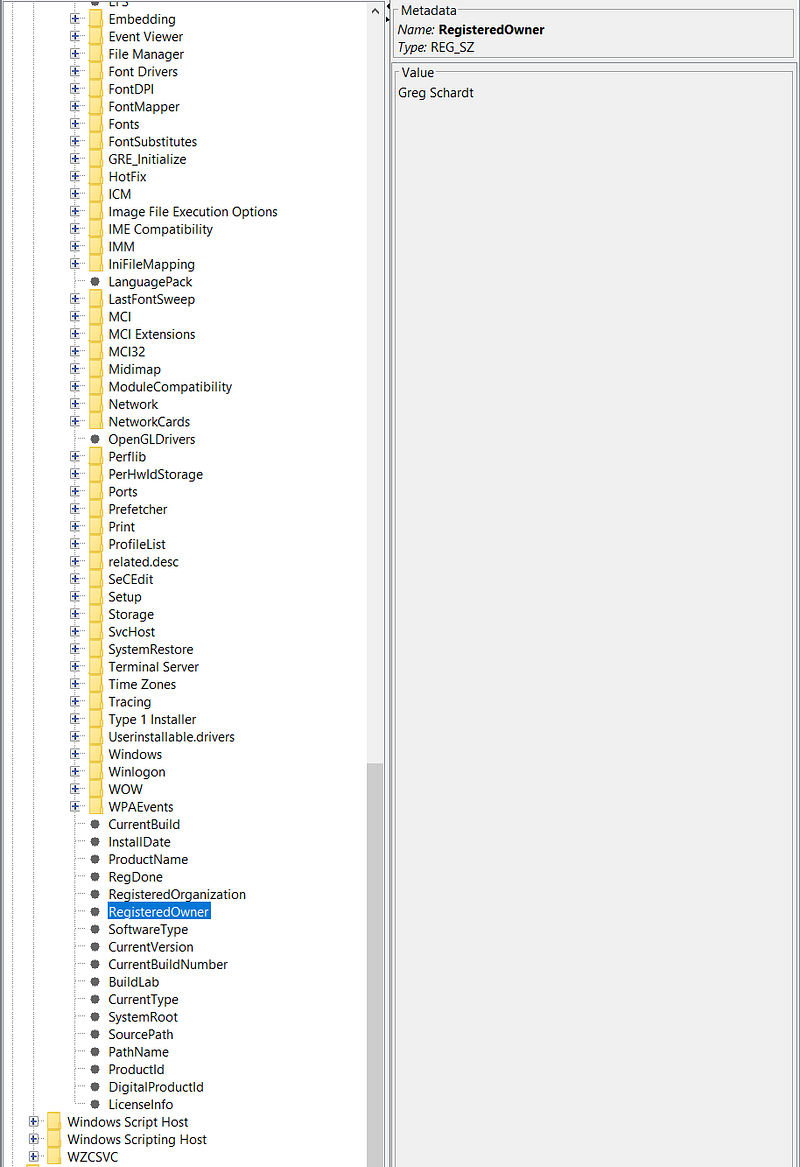
Well, that confirms the suspicion!
**6. What is the computer account name?**
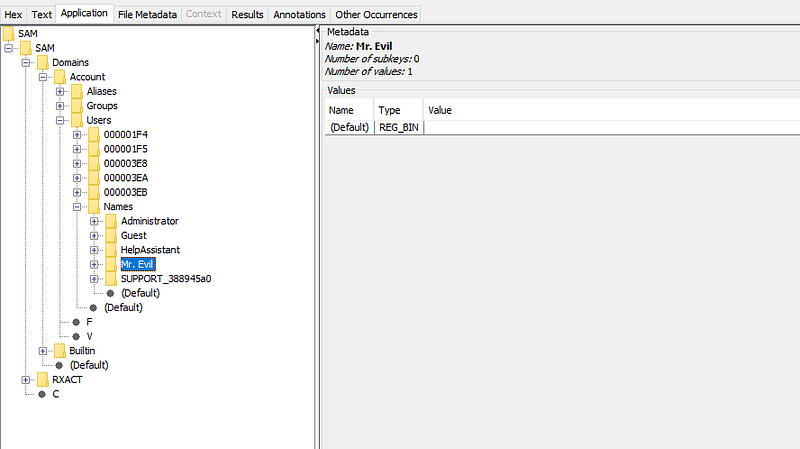
Time to switch things up! Let’s have a look in the SAM hive:
`Windows > System32 > Config > SAM > Domains > Account > Users > Names`
**7. What is the primary domain name?**
Can you guess where this is? Yeah — the Software Hive! By now, you know the drill, so let’s skip the full path.

**8. When was the last recorded computer shutdown date/time?**
For this one, we’re going to have to do a few minorly inconvenient calculations. Start by grabbing the hex value shown in the screenshot below. If you’re familiar with system internals, you’ll recall that byte-level formatting is dictated by endianness. Endianness refers to the order in which each byte is stored. In Windows, it’s little-endian, meaning the least significant bytes are stored first.
`Windows > System32 > Config > System Hive > ControlSet001 > Control > Windows > ShutdownTime`
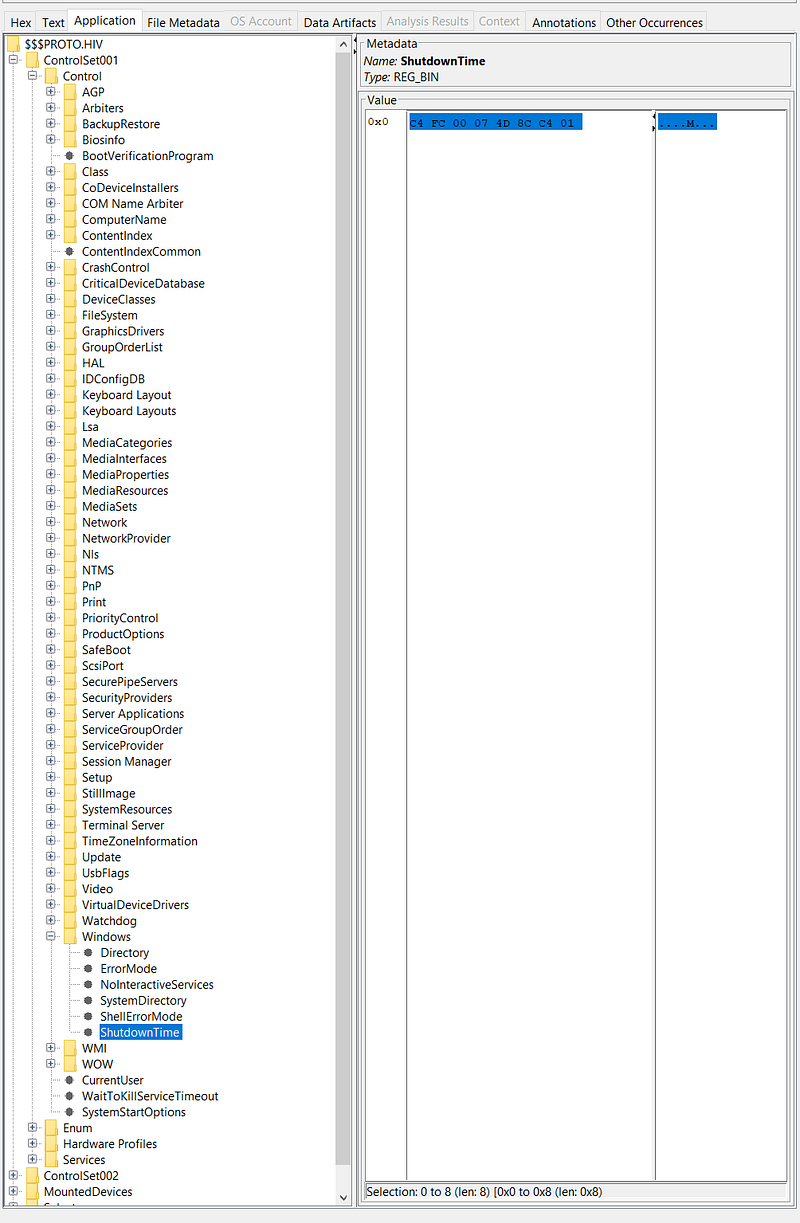
Considering that each byte is represented by 2 characters, we begin with the value **C4 FC 00 07 4D 8C C4 01.** As Missy Elliott once said, ‘I put my thing down, flip it and reverse it’- and voila, we now have **01 C4 8C 4D 07 00 FC C4**. Now, assuming that this is stored in a similar way as ‘InstallDate’ which we saw previously, we can convert this hex value to decimal which will give us **127380951931092164**.
Admittedly, after some much needed googling I concluded that rather than being stored in seconds like the Unix Timestamp, it’s a Windows Timestamp. This timestamp uses a format of how many 100-nanosecond intervals there have been since January 1st, 1601. Knowing this, we can pass it into a Windows Timestamp calculator.
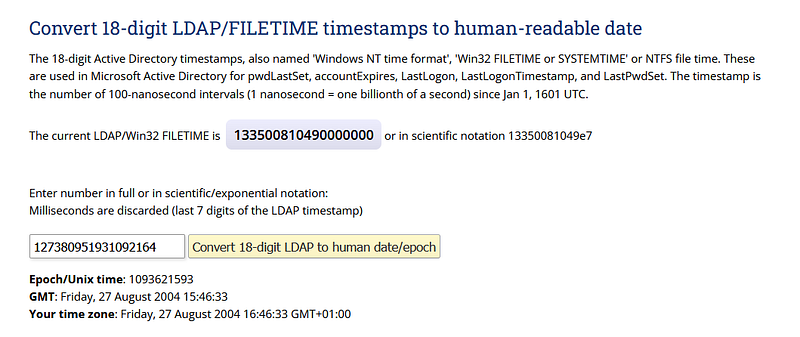
_Friday, 27 August 2004 15:46:33_. Notice that for our timezone it says GMT +01:00_._ Previously, we were able to use GMT -06:00 to calculate the correct time. Now we will do GMT -05:00 leaving us with **Friday, 27 August 2004 10:46:33AM**_._
**9. How many accounts are recorded?**
As we saw previously in Q6, there are 5 accounts listed in the SAM Hive.

**10. What is the account name of the user who mostly uses the computer?**
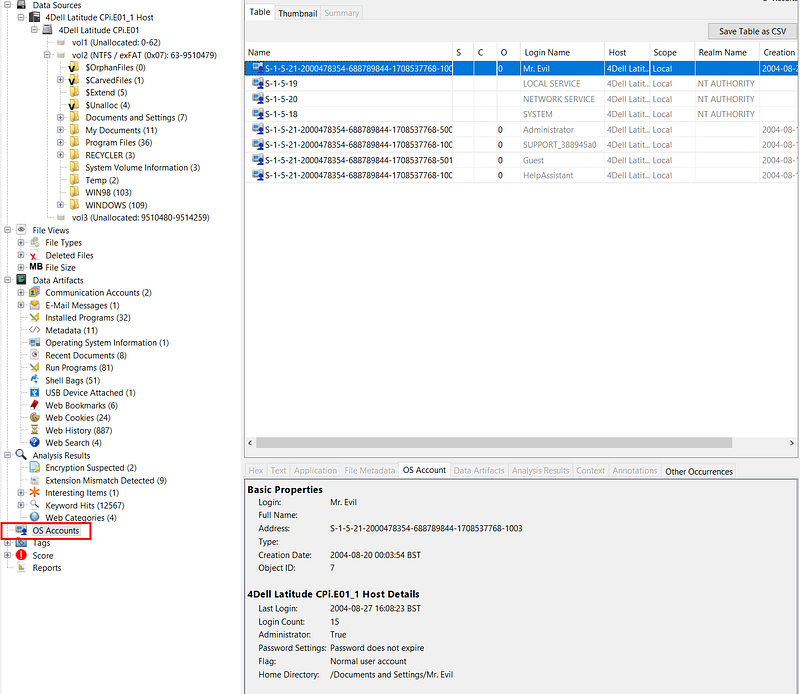
For this, we don’t have to do a registry exploration — Autopsy has a handy section built in.
**11. Who was the last user to logon to the computer?**
With the information gathered in question 10 and through the process of elimination, we can deduce that ‘Mr.Evil’ logged in last.
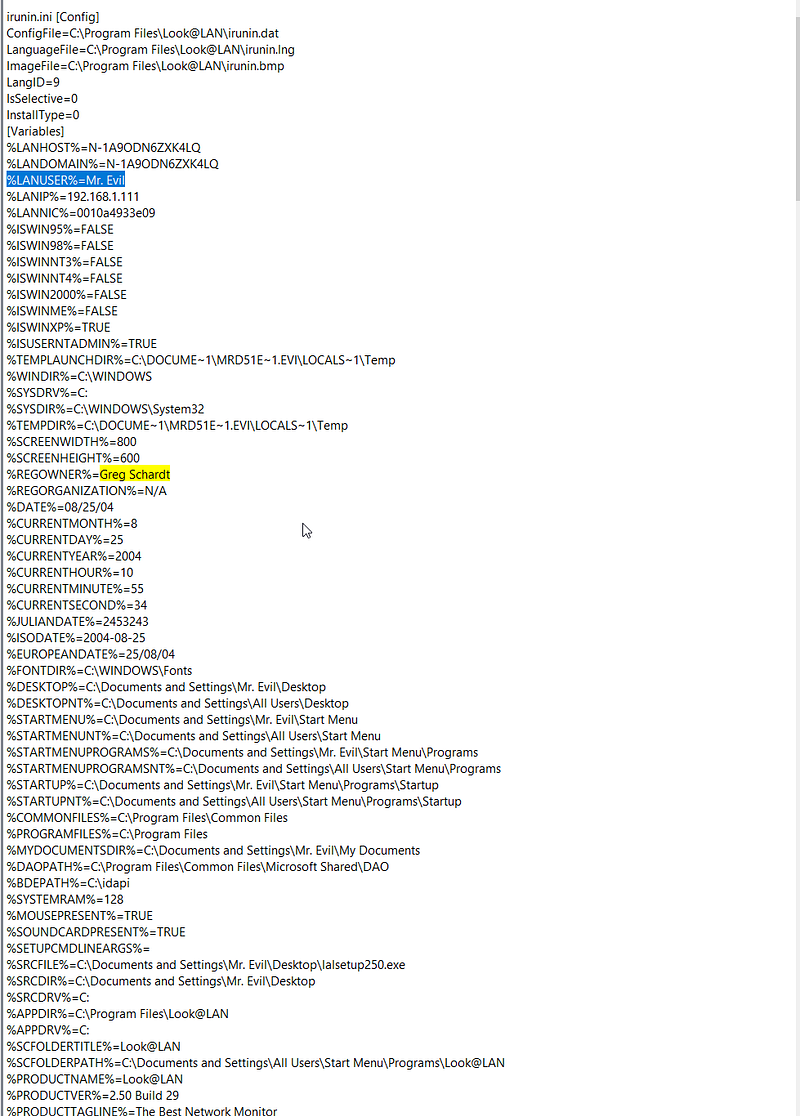
**12. A search for the name of ‘Greg Schardt’ reveals multiple hits. One of these proves that Greg Schardt is Mr.Evil and is also the administrator of this computer. What file is it? What software program does this file relate to?**

Here, we can see evidence of a program called ‘Look@LAN_’._
> [!Info]
> Look@Lan is an advanced network monitor that allows you to monitor your net in few clicks. Extremely easy to use and very fast in discovering your network’s active nodes. Full of relevant features such as: auto-detect of network configuration, monitoring, reporting, trapping, statistics and graphs, network tree view, network log, proof single node scan, os detection.
Looking further into ‘irunin.ini_’_, we have our proof that Greg is indeed ‘Mr.Evil’.
**13. List the network cards used by this computer**
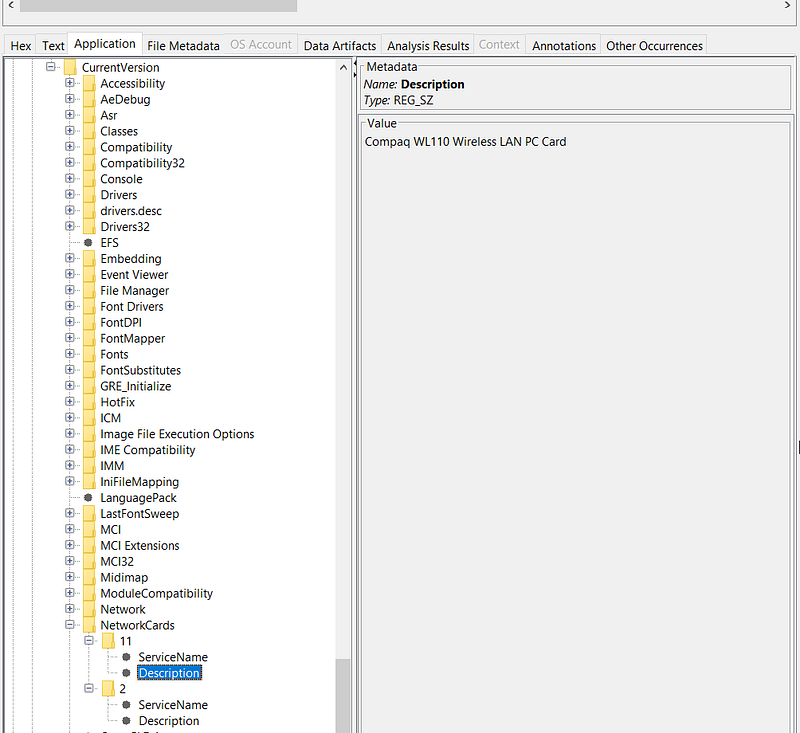
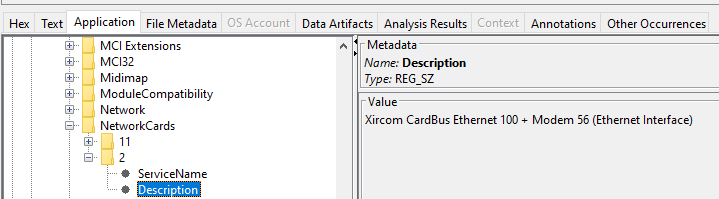
`Windows > System32 > Config > Software Hive > Microsoft > Windows NT > CurrentVersion > NetworkCards`
There are two network cards: ‘Compaq WL110 Wireless LAN PC Card’ and ‘Xircom CardBus Ethernet 100 + Modem 56 (Ethernet Interface)_’_.
**14. This same file reports the IP address and MAC address of the computer. What are they?**
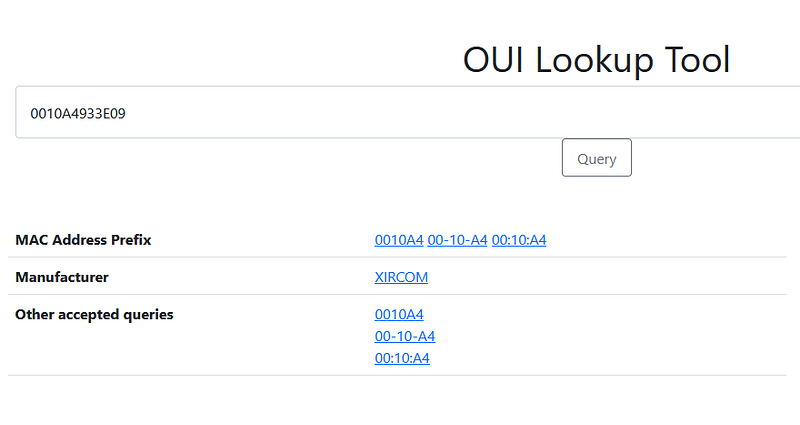
This question isn’t very clear but if we search again for the ‘Look@LAN’ file from Q12 that tied ‘Mr.Evil’ to Greg Schardt, we’re able to find an IP and MAC address.

**15. An internet search for vendor name/model of NIC cards by MAC address can be used to find out which network interface was used. Which NIC card was used during the installation and set-up for LOOK@LAN ?**
Searching the MAC address of the Network Interface Card allows us to conclude that the ‘Xircom CardBus Ethernet 100 + Modem 56 (Ethernet Interface)_’_ was used during installation and set-up.
**16. Find 6 installed programs that may be used for hacking**
With Autopsy’s handy ‘Installed Programs’ module, we can swiftly sift through the list of programs and notice some names that are especially intriguing.
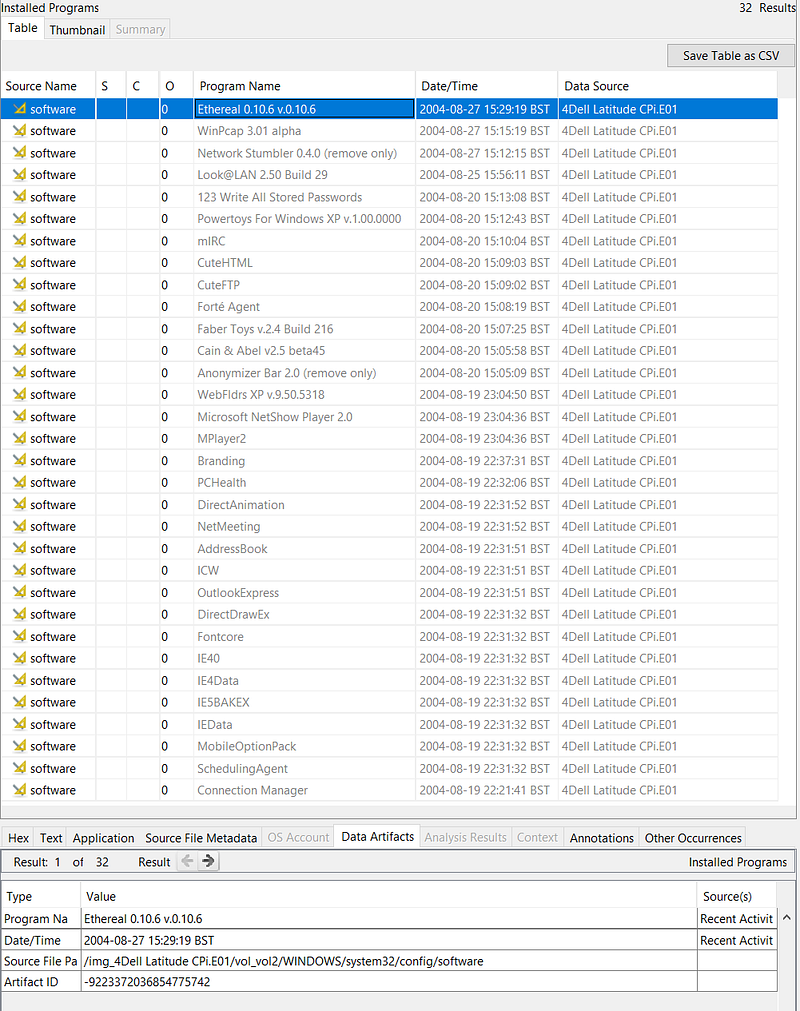
- Ethereal (Packet Sniffing)
- Network Stumbler (Wi-Fi Discovery Tool)
- Look@LAN (Network Discovery)
- 123 Write All Stored Passwords (Hunts Passwords in Registry)
- CuteFTP (FTP… but cuter)
- Anonymizer (Makes Internet Activity Untraceable)
**17. What is the SMTP email address for Mr. Evil?**
A quick search for ‘SMTP’ reveals a connection to the ‘NTUSER.DAT’.
> [!Info]
> NTUSER.DAT is a windows generated file which contains the information of the user account settings and customizations. Each user will have their own NTUSER.DAT file in their user’s profile.
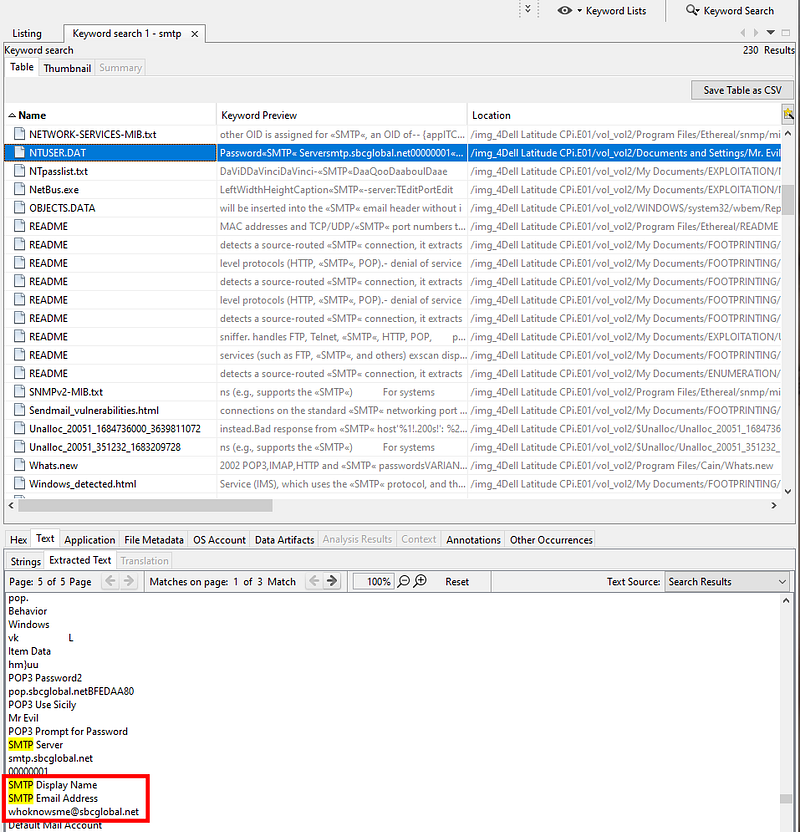
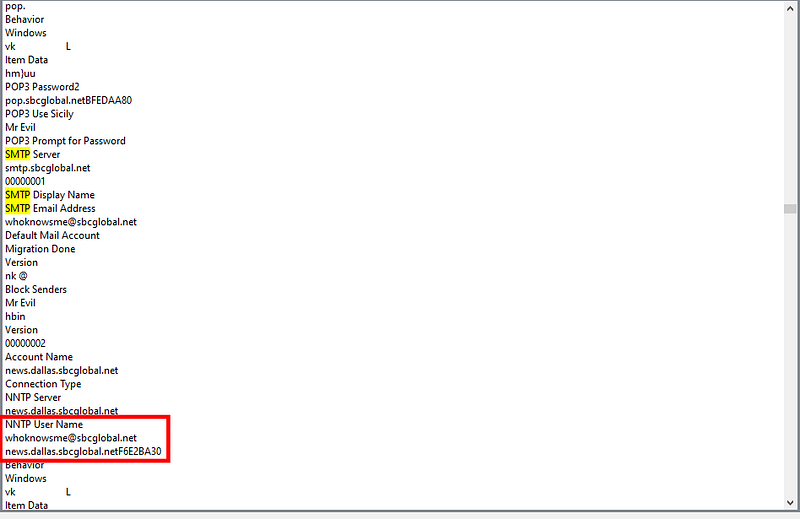
**18. What are the NNTP (news server) settings for Mr. Evil?**
The same ‘NTUSER.DAT’ file also gives us this information: ‘news.dallas.sbcglobal.net’
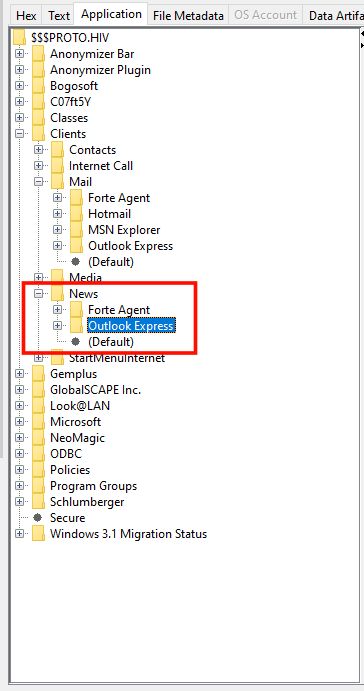
**19. What two installed programs show this information?**
Returning to our trusty Software Hive, we can see that there are two programs related to news.
**20. List 5 newsgroups that Mr. Evil has subscribed to**
I actually had to google what a news group was for this and came across an old forum [post](https://superuser.com/questions/661398/outlook-express-6-how-can-i-transfer-newsgroup-messages-to-a-new-pc) which mentions a ‘.dbx’ file.
> [!Info]
> A DBX file is **an email extension created by desktop email client Outlook Express**. It is a collection of folders that saves OE mailbox as . dbx for a user profile.
Equipped with this knowledge, we can have a look in ‘Mr.Evil’s’ user profile:
`Documents and Settings > Mr.Evil > Local Settings > Application Data > Identities > Gobbledygook > Microsoft > Outlook Express`
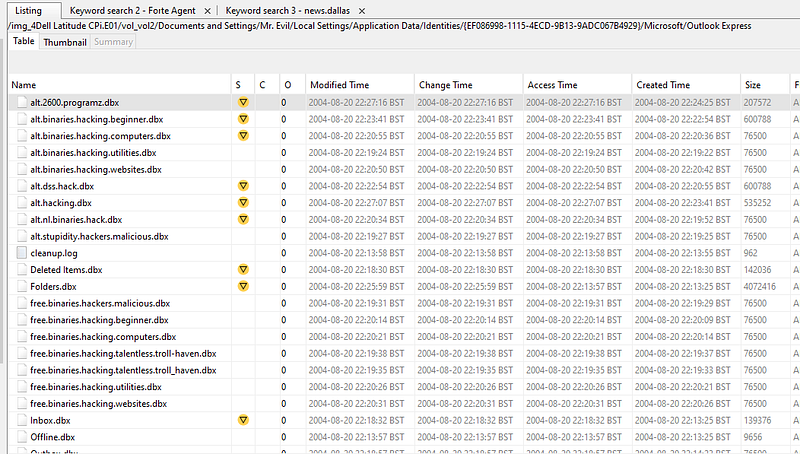
Loads of ‘.dbx’ files, some of which are the newsgroups that ‘Mr.Evil’ has subscribed to.
**21. A popular IRC (Internet Relay Chat) program called MIRC was installed. What are the user settings that was shown when the user was online and in a chat channel?**
In the ‘Program Files’ directory, we spot a ‘mirc.ini’ file which reveals the configuration. Don’t overlook the presence of a ‘logs’ directory — could prove useful.
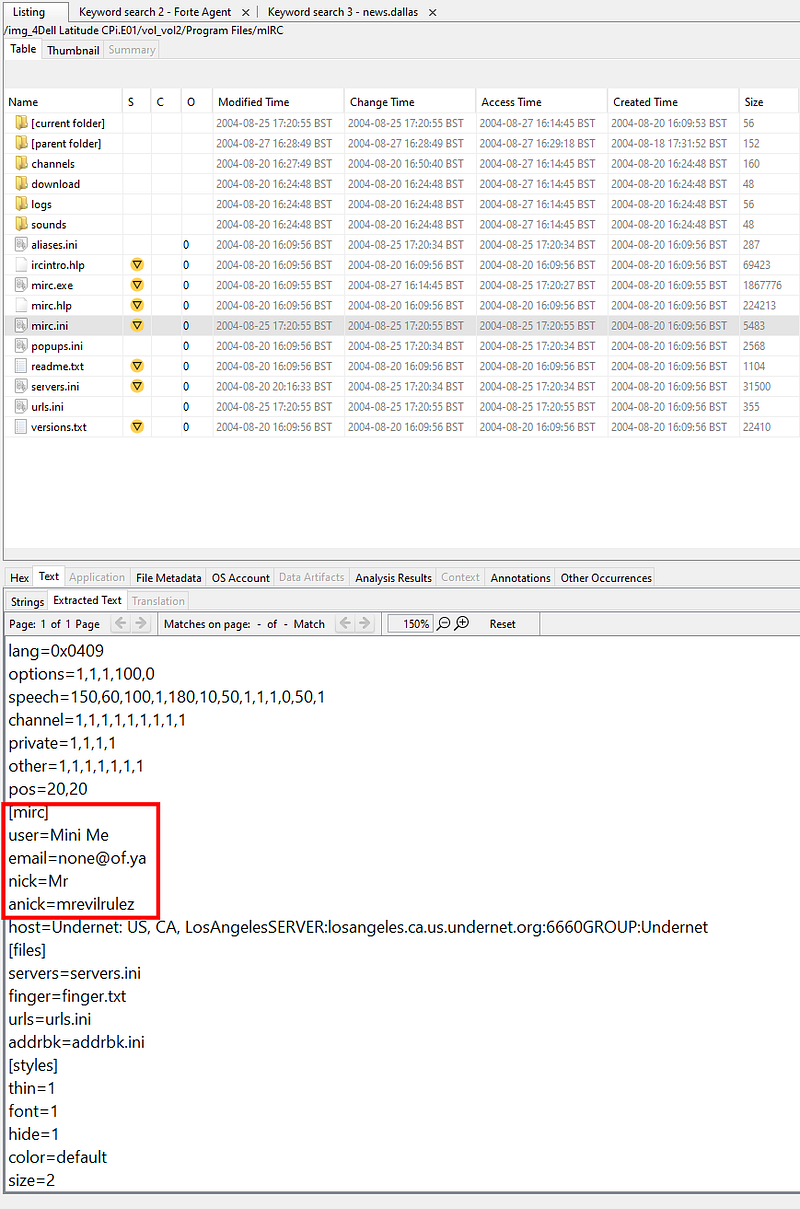
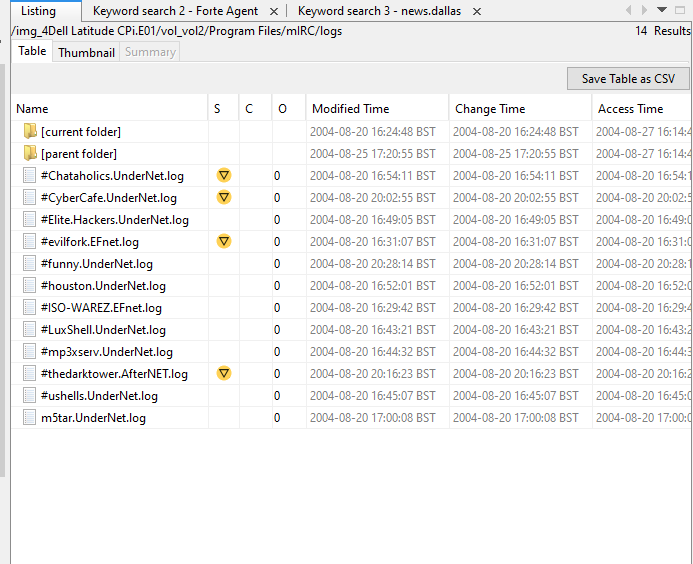
**22. This IRC program has the capability to log chat sessions. List 3 IRC channels that the user of this computer accessed.**
You guessed it–_logs_.
**23. Ethereal, a popular “sniffing” program that can be used to intercept wired and wireless internet packets was also found to be installed. When TCP packets are collected and re-assembled, the default save directory is that users \My Documents directory. What is the name of the file that contains the intercepted data?**
A lazy search for ‘Ethereal’ leads us to the following file, revealing where the recent capture files are stored.

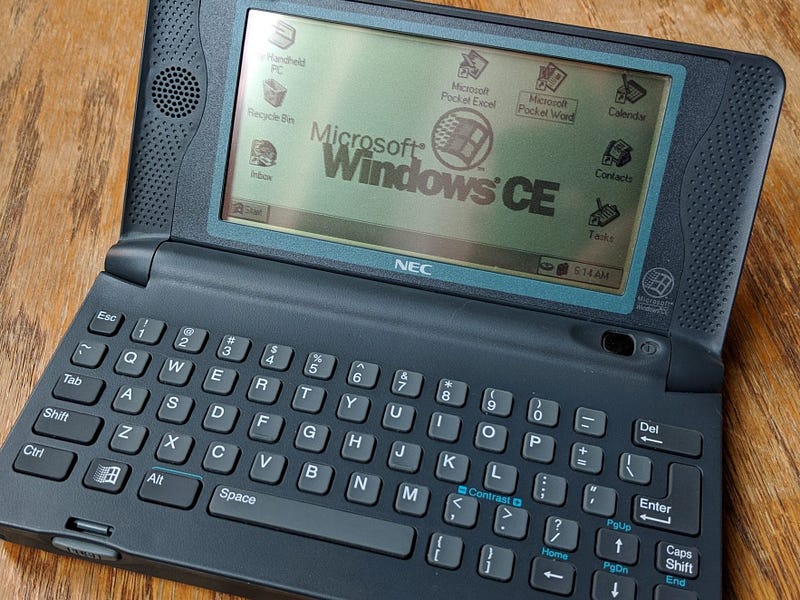
**24. Viewing the file in a text format reveals much information about who and what was intercepted. What type of wireless computer was the victim (person who had his internet surfing recorded) using?**
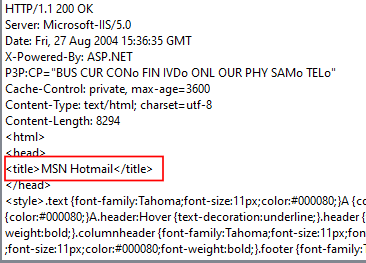
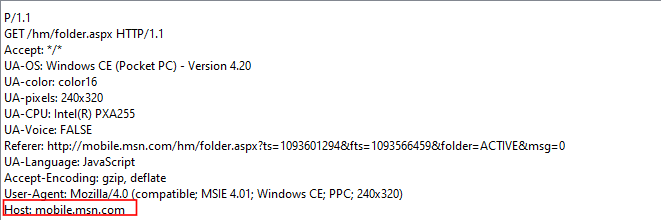
Following the breadcrumbs from the previous question confirms the existence of the ‘interception’ file which tells us that the victim was using a Windows CE Pocket PC… old school.
**25. What websites was the victim accessing?**
Examining the ‘interception’ file provides us with what we’re looking for here.
**26. Search for the main users web based email address. What is it?**
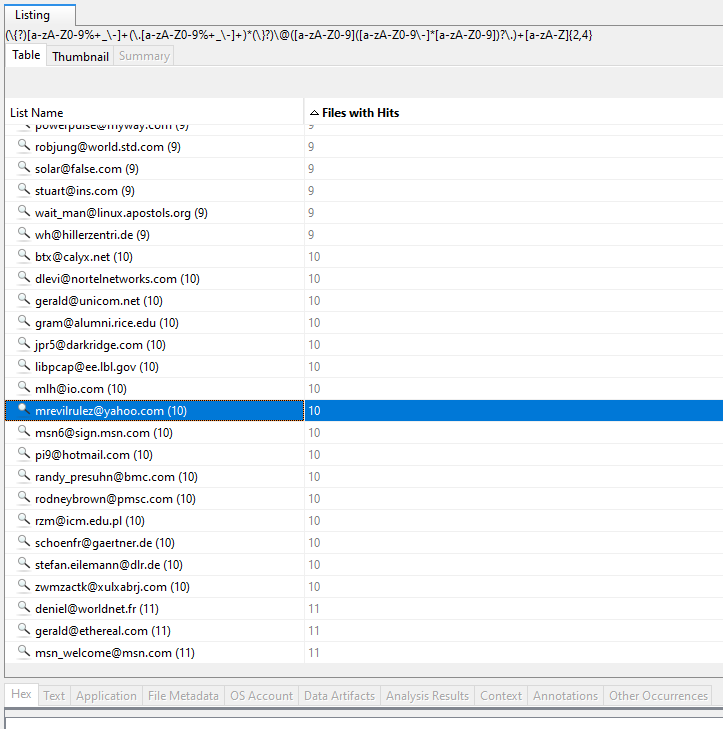
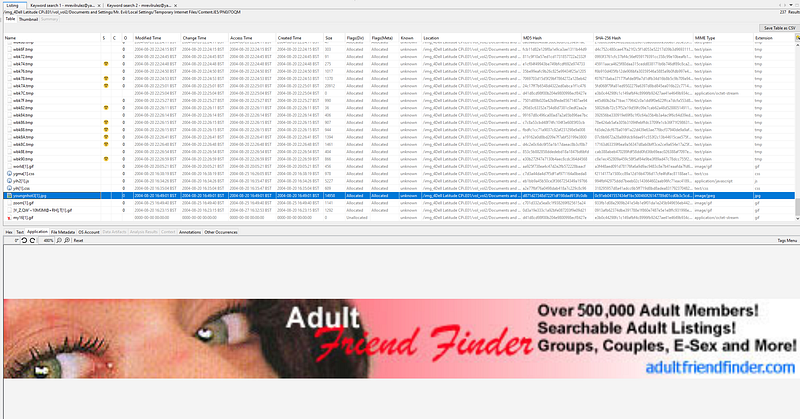
For this we can use the ‘Cookies’ section embedded in Autopsy. Naturally, if we’re looking for a main user, we’ll filter the listings by ‘Files with Hits’_. S_omething sticks out while scrolling through this list.
We can further confirm that this is correct by searching for that email address which links to some cached Internet Explorer files:
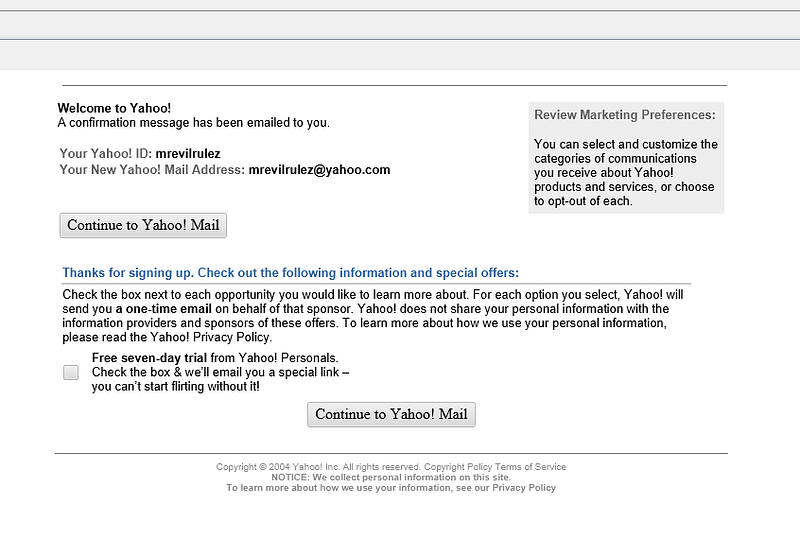
Alright, I have to confess – I got a little bit side-tracked. Mr. Evil, what have you been up to?
**27. Yahoo mail, a popular web based email service, saves copies of the email under what file name?**
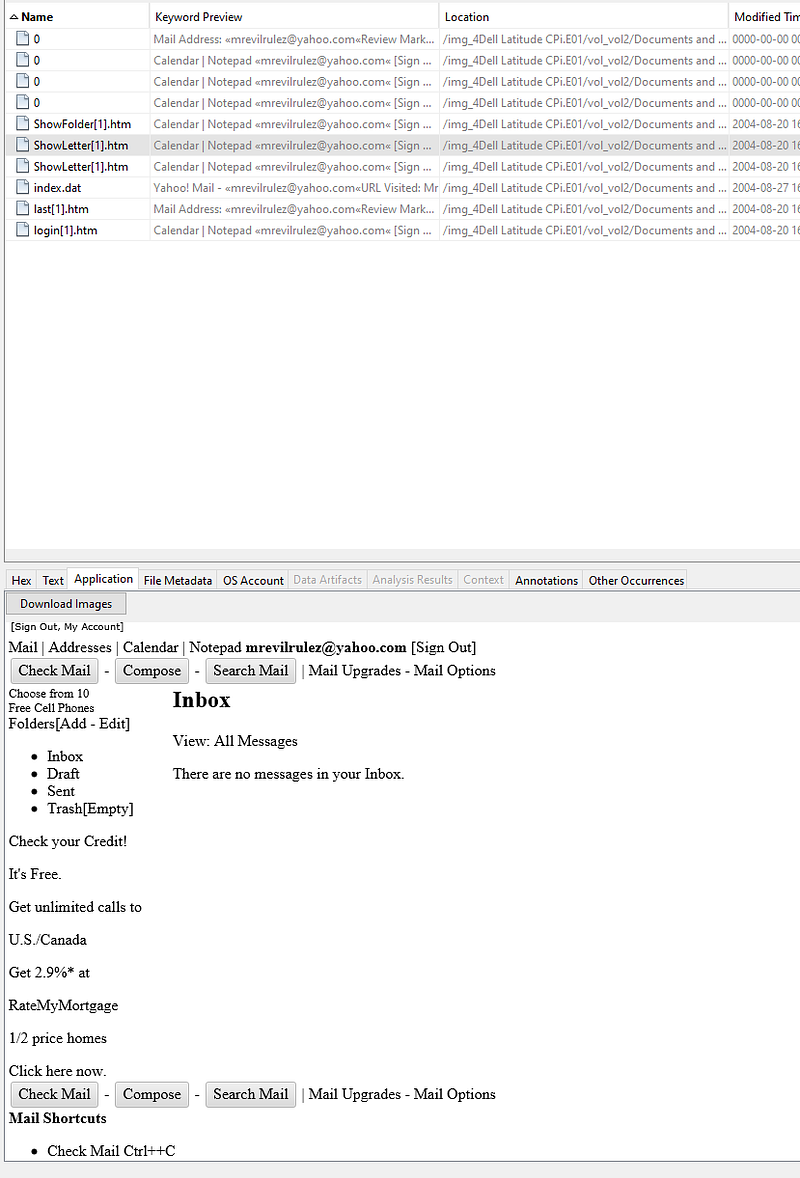
Remember when we did a search for `
[email protected]`? Taking another look at the results reveals a file called `ShowLetter[1].htm`.
**28. How many executable files are in the recycle bin?**
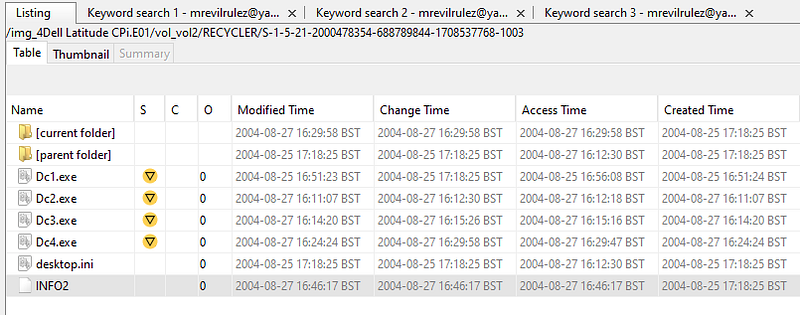
As we can see from the ‘RECYCLER' directory, there are four executables in the recycle bin. To answer Question 29 as to whether these files are really deleted or not, we know they’re not permanently removed as they’re only in the recycle bin.
**30. How many files are actually reported to be deleted by the file system?**
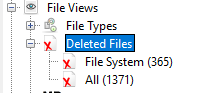
Simply using the side menu provided by Autopsy, we see that there are 1371 reportedly deleted files.
**31. Perform a Anti-Virus check. Are there any viruses on the computer?**
There is an Anti-Virus module available with Autopsy but it appears to come at a cost. We’ll just use the ‘Interesting Files’ section for this.

> [!Info]
> Wikipedia: In computing, a **zip bomb**, also known as a **decompression bomb** or **zip of death**, is a malicious [archive file](https://en.wikipedia.org/wiki/Archive_file "Archive file") designed to crash or render useless the program or system reading it. It is often employed to disable [antivirus software](https://en.wikipedia.org/wiki/Antivirus_software "Antivirus software"), in order to create an opening for more traditional [malware](https://en.wikipedia.org/wiki/Malware "Malware").
### Conclusion
Thank you joining me on our journey through *The Hacking Case*, where we witnessed the power that forensics tools like Autopsy wield in the world of digital forensics. Let this be a reminder of the importance of keeping your drives encrypted! I look forward to having you with me in the next one!